
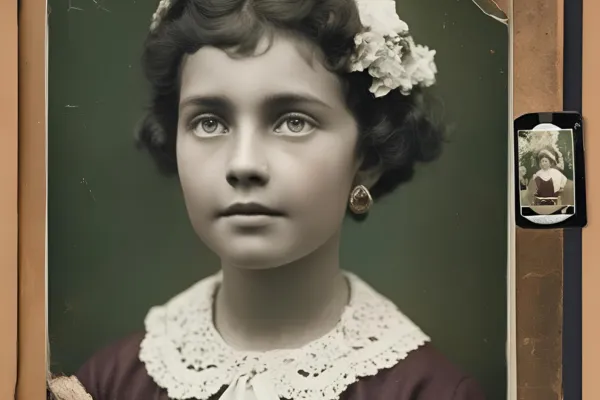
How to Use AI to Restore Old and Damaged Photos? Preserving visual memories is a universal human desire.
Advertisements
Old photos, often stored in dusty albums or forgotten drawers, carry the stories of generations.
However, time is relentless: tears, stains, fading and scratches often compromise these relics.
Fortunately, artificial intelligence (AI) is emerging as a revolutionary tool capable of restoring old and damaged photos accurately and efficiently.
But how exactly does AI perform this digital magic?
And why has it become indispensable for those who want to rescue the past?
Continue reading and find out more:
The Power of AI in Image Restoration

AI for restoring old and damaged photos operates like a highly trained digital restorer.
Using machine learning algorithms such as convolutional neural networks (CNNs), AI analyzes damaged pixels and reconstructs missing areas based on learned visual patterns.
Unlike manual methods, which require hours of meticulous work in Photoshop, AI automates the process.
See also: How to Use ChatGPT to Streamline Administrative and Creative Tasks
That is, identifying imperfections such as scratches, stains or fading and filling gaps with realistic details.
Furthermore, AI not only fixes damage but also enhances the overall image quality.
For example, technologies such as super resolution increase the resolution of old photos, making them sharper.
Tools based on generative models, such as GANs (Generative Adversarial Networks), go further, recreating textures and colors that have been lost over time.
This level of sophistication allows even severely damaged photos to be restored with results that seem almost miraculous.
Finally, the accessibility of these tools is a differentiator.
Platforms like MyHeritage, Remini, and even open-source software like GFP-GAN democratize restoration, allowing anyone, without technical knowledge, to recover their memories.
Thus, AI is not just a technical solution, but a means of reconnecting people with their past.
Have you ever stopped to think about the emotional impact of seeing a grandfather's face in a clear photo for the first time?
Benefits of Using AI to Restore Photos
First, AI photo restoration offers an invaluable emotional benefit.
Old photos often represent connections with loved ones, historical moments, or cultural heritage.
++ Why investing in cloud storage is advantageous
When using AI to restore old and damaged photos, it is possible to relive these memories clearly, rekindling emotional bonds.
For example, imagine a faded and torn 1940s wedding photo that, after restoration, reveals details of the bride's dress and the joyful expressions of the guests.
Furthermore, AI provides efficiency and savings.
Hiring a professional restorer can cost hundreds of dollars per photo, while AI tools, often available for affordable subscriptions or even for free, can do the same job in minutes.
A relevant statistic from Adobe reveals that 68% of users of AI-based image editing tools reported significant time savings on restoration projects.
In this sense, allowing more people to preserve their memories without financial barriers.
Lastly, AI ensures consistency and accuracy.
Unlike manual work, which is subject to human error, AI follows strict standards, ensuring uniform results.
Similarly, think of AI as a digital archaeologist, digging through layers of damage to reveal the original essence of the image while preserving its authenticity.
This level of care makes the technology ideal for large-scale projects, such as digitizing family archives or historical collections.
Practical Examples of Restoration with AI
To illustrate the potential of AI to restore old and damaged photos, let us consider the case of Ana, an amateur historian.
++ The apps that went viral on TikTok in 2025 and are worth downloading
Ana found a photo of her great-grandmother, taken in 1920, with deep scratches and faded areas.
Using the MyHeritage platform, she uploaded the image, and the AI automatically corrected the damage, recreated facial textures and even colorized the photo, revealing skin tones and details of the dress that Ana had never seen before.
The result was so impactful that Ana decided to restore the entire family album, creating a digital collection for future generations.
Another example is Miguel, a photographer who works with historical archives.
He received a collection of photographs of a Brazilian city from the 1930s, many with mold stains and tears.
Miguel used the GFP-GAN software, which combines neural networks for facial reconstruction and texture restoration.
The result was a series of sharp images, with architectural details and human expressions preserved, which were displayed in a local museum.
This project not only rescued the city's history, but also attracted visitors interested in technology and preservation.
These examples demonstrate how versatile AI is, serving both personal and professional projects.
Tools like Remini, for example, are ideal for casual users, while advanced software like Photoshop with AI plugins cater to professionals.
Regardless of the goal, AI makes restoration accessible, fast, and emotionally rewarding.
How to Choose the Best AI Tool for Restoration

Choosing the right tool to use AI to restore old and damaged photos depends on factors such as skill level, budget and objective.
For beginners, platforms like Remini or MyHeritage are intuitive, requiring only image upload.
These tools offer fast results, but may have limitations in cases of extreme damage where manual adjustments are necessary.
On the other hand, professionals or enthusiasts with technical knowledge can opt for software like Adobe Photoshop with AI plugins or open-source tools like GFP-GAN.
These programs allow greater control, enabling fine adjustments to colors, textures and details.
However, they require a learning curve and, in some cases, more powerful hardware to process high-resolution images.
The table below compares some of the main tools available, helping you decide which one is best suited to your needs:
| Tool | Skill Level | Cost | Key Features | Ideal for |
|---|---|---|---|---|
| MyHeritage | Beginner | Free (limited) / Paid | Colorization, automatic repair, simple interface | Personal projects |
| Remini | Beginner | Freemium | Resolution enhancement, fast restoration | Casual use, family photos |
| Adobe Photoshop + AI | Advanced | Subscription (R$ 90/month) | Full control, AI plugins, professional editing | Professionals, complex projects |
| GFP-GAN | Advanced | Free (open-source) | Facial reconstruction, high precision | Technical enthusiasts, collections |
Ethics and Care When Using AI in Catering
Although the AI to restore old and damaged photos is a powerful tool, its use raises ethical questions.
For example, colorizing black and white photos can alter historical perception, as the colors are estimated by AI and do not reflect the original reality.
Therefore, it is crucial to inform when an image has been modified, especially in historical or journalistic contexts, to avoid distortions.
Additionally, privacy is a concern.
When uploading photos to online platforms, users should check data policies to ensure their images are not used for other purposes, such as training AI models.
Opting for offline tools like Photoshop or platforms with transparent policies like MyHeritage can mitigate these risks.
Finally, it is important to balance automation and human intervention.
While AI is efficient, manual adjustments may be necessary to preserve the authenticity of cultural or emotional details.
For example, a photo from a traditional event may require specific adjustments to maintain accuracy of elements like clothing or backdrops, which AI may interpret incorrectly.
AI to Restore Old and Damaged Photos: Frequently Asked Questions
The following table answers the most common questions about using AI to restore old and damaged photos, offering clarity and guidance:
| Question | Response |
|---|---|
| Can AI restore severely damaged photos? | Yes, but success depends on the extent of the damage. Completely lost areas can be reconstructed based on patterns, but with limitations. |
| Is it safe to upload personal photos to AI platforms? | It depends on the platform. Choose tools with clear privacy policies and avoid sharing sensitive images on untrusted services. |
| Is colorization of old photos accurate? | No, colorization is an estimate based on trained data. Always indicate when a photo was colorized to avoid historical misunderstandings. |
| How long does it take to restore a photo with AI? | Seconds to minutes, depending on the tool and the complexity of the image. Tools like Remini are faster, while Photoshop can be slower. |
| Can I use AI to restore photos on a large scale? | Yes, many tools allow batch processing, ideal for family collections or historical archives. |
AI to Restore Old and Damaged Photos: Conclusion
THE AI to restore old and damaged photos It is more than a technological tool; it is a bridge to the past.
By combining technical precision with accessibility, it enables everyday people and professionals to recall memories with ease and emotion.
Whether restoring a single family photo or a historical collection, AI offers practical, cost-effective and impactful solutions.
With the right tools and an ethical approach, you can transform worn-out images into digital time capsules, ready to inspire future generations.
So, which photo from your past will you bring back to life today?
